![Upgraded Version Cablecreation Bidirectional/non Bidirectional Usb C To Displayport Cable 4k 8k@60hz Dp 1.4 To Type C Cable For Macbook Pro Air Get Yours Today [1Sgb3a4O]](https://cdn.shopify.com/s/files/1/0427/5303/2355/files/S2037e62aab4447d09a01e7b43c92b01cg.webp?v=1719276982)
![Upgraded Version Cablecreation Bidirectional/non Bidirectional Usb C To Displayport Cable 4k 8k@60hz Dp 1.4 To Type C Cable For Macbook Pro Air Get Yours Today [1Sgb3a4O]](https://cdn.shopify.com/s/files/1/0427/5303/2355/files/S40072140adaf40c782fe9146a228da9ac.webp?v=1719276982)
![Upgraded Version Cablecreation Bidirectional/non Bidirectional Usb C To Displayport Cable 4k 8k@60hz Dp 1.4 To Type C Cable For Macbook Pro Air Get Yours Today [1Sgb3a4O]](https://cdn.shopify.com/s/files/1/0427/5303/2355/files/Sa8e919b34c3f435aa597d31fc05d1ffdQ.webp?v=1719276982)
![Upgraded Version Cablecreation Bidirectional/non Bidirectional Usb C To Displayport Cable 4k 8k@60hz Dp 1.4 To Type C Cable For Macbook Pro Air Get Yours Today [1Sgb3a4O]](https://cdn.shopify.com/s/files/1/0427/5303/2355/files/Sb0a3fb717ad04018a4ea52ffffbf668cb.webp?v=1719276982)
![Upgraded Version Cablecreation Bidirectional/non Bidirectional Usb C To Displayport Cable 4k 8k@60hz Dp 1.4 To Type C Cable For Macbook Pro Air Get Yours Today [1Sgb3a4O]](https://cdn.shopify.com/s/files/1/0427/5303/2355/files/S62f0b7b1c2084bf48c407a4d323dd803c.webp?v=1719276982)
![Upgraded Version Cablecreation Bidirectional/non Bidirectional Usb C To Displayport Cable 4k 8k@60hz Dp 1.4 To Type C Cable For Macbook Pro Air Get Yours Today [1Sgb3a4O]](https://cdn.shopify.com/s/files/1/0427/5303/2355/files/S9efe86cfd4704c92a5aa150b0f821049c.webp?v=1719276983)
![Upgraded Version Cablecreation Bidirectional/non Bidirectional Usb C To Displayport Cable 4k 8k@60hz Dp 1.4 To Type C Cable For Macbook Pro Air Get Yours Today [1Sgb3a4O]](https://cdn.shopify.com/s/files/1/0427/5303/2355/files/Sd45b9da0ef7342d59e31ea4fd1d3cb85C.webp?v=1719276982)
![Upgraded Version Cablecreation Bidirectional/non Bidirectional Usb C To Displayport Cable 4k 8k@60hz Dp 1.4 To Type C Cable For Macbook Pro Air Get Yours Today [1Sgb3a4O]](https://cdn.shopify.com/s/files/1/0427/5303/2355/files/S65ab2b19a8c844a1ae64db085e99729fX.webp?v=1719276982)
![Upgraded Version Cablecreation Bidirectional/non Bidirectional Usb C To Displayport Cable 4k 8k@60hz Dp 1.4 To Type C Cable For Macbook Pro Air Get Yours Today [1Sgb3a4O]](https://cdn.shopify.com/s/files/1/0427/5303/2355/files/S4721d8f0d99147fa8a0fcb54fe791b17X.webp?v=1719276982)
Upgraded Version Cablecreation Bidirectional/non Bidirectional Usb C To Displayport Cable 4k 8k@60hz Dp 1.4 To Type C Cable For Macbook Pro Air Get Yours Today [1Sgb3a4O]
SPECIFICATIONSBrand Name: cablecreationConnector B: DisplayPort(DP)Gender: Male-MaleModel Number: CD0738Origin: Mainland ChinaType: DP/Mini DP CablesConnector A: TYPE-CPackage: YesPacking: PolybagCertification: CEShielding: BraidApplication: For iPod
Secure Shopping
100% Safe Guarantee
Free Shipping
On orders over $30
Money-Back
30-Day Guarantee
Upgraded Version Cablecreation Bidirectional/non Bidirectional Usb C To Displayport Cable 4k 8k@60hz Dp 1.4 To Type C Cable For Macbook Pro Air Get Yours Today [1Sgb3a4O]
SPECIFICATIONS
Brand Name: cablecreation
Connector B: DisplayPort(DP)
Gender: Male-Male
Model Number: CD0738
Origin: Mainland China
Type: DP/Mini DP Cables
Connector A: TYPE-C
Package: Yes
Packing: Polybag
Certification: CE
Shielding: Braid
Application: For iPod
Application: Computer
Application: Monitor
Application: DVD Player
Application: Projector
Application: Television
Application: TV box
Version: DisplayPort 1.4
Cable Length: 1.8m
Compatible Devices: Tablet , Laptop , Television , Monitor , Personal Computer , Projector
Style: Bidirectional 8K@60Hz
Connector Gender: Male-to-Male
Connector Type: Usb Type C, Displayport
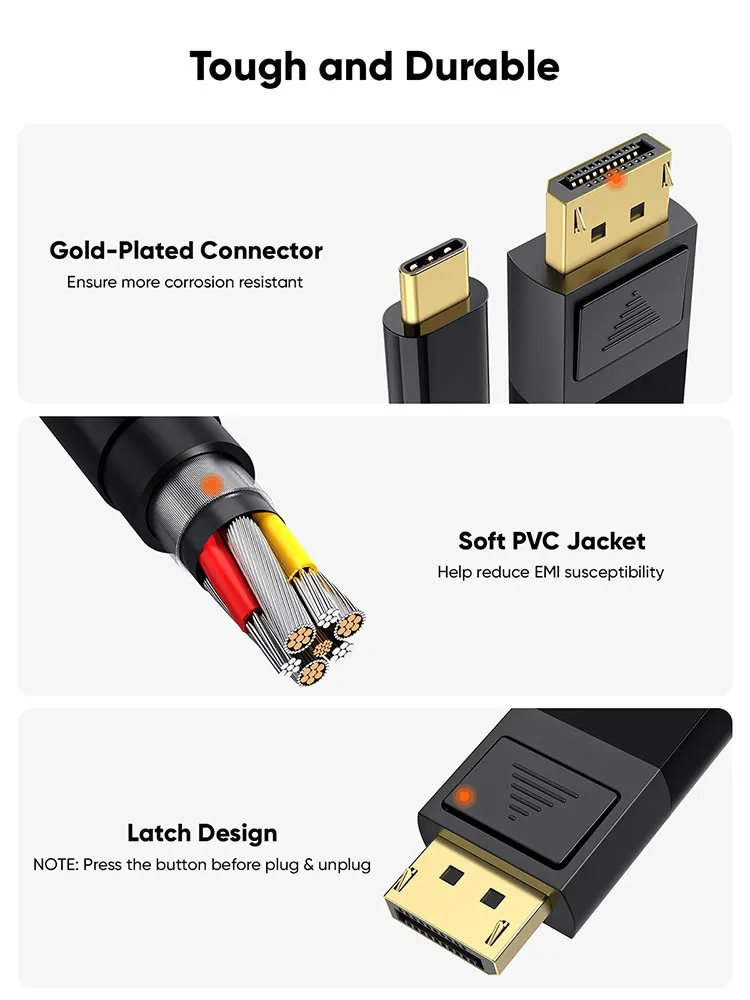
Fabric Type: Gold-plated Connector , ABS Shell
Data Transfer Rate: 2.7 gigabits per second
Specific Uses For Product: Gaming , Video , Communication
Bi-Directional USB C to DP Cable
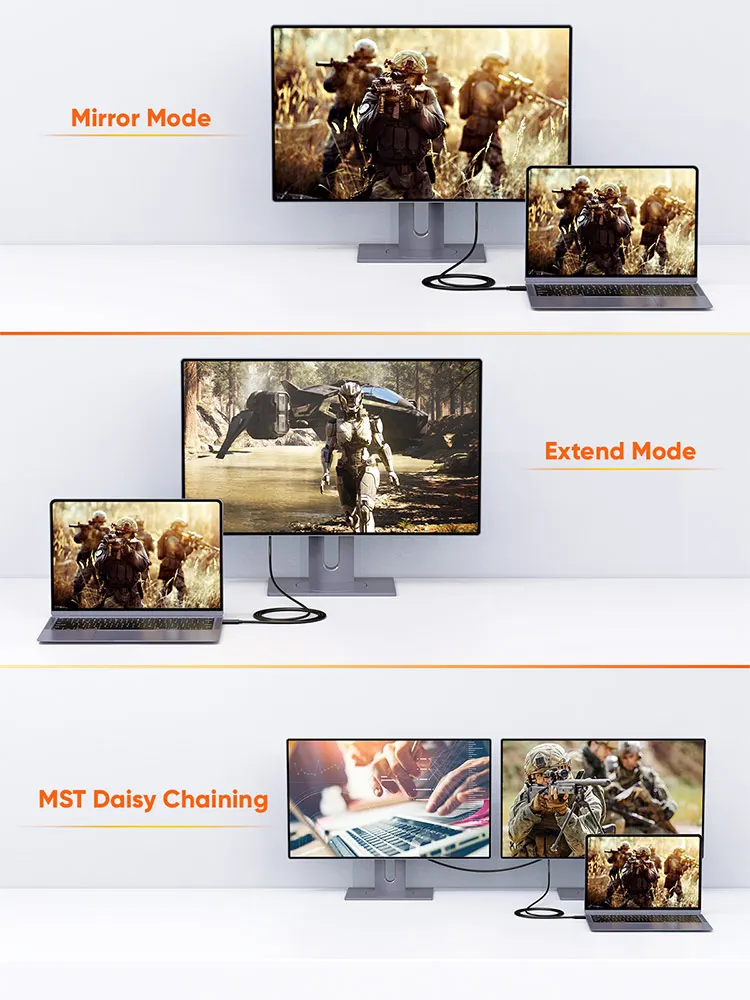
Support Mirror Mode, Extend Mode, MST Daisy Chaining
Specifications
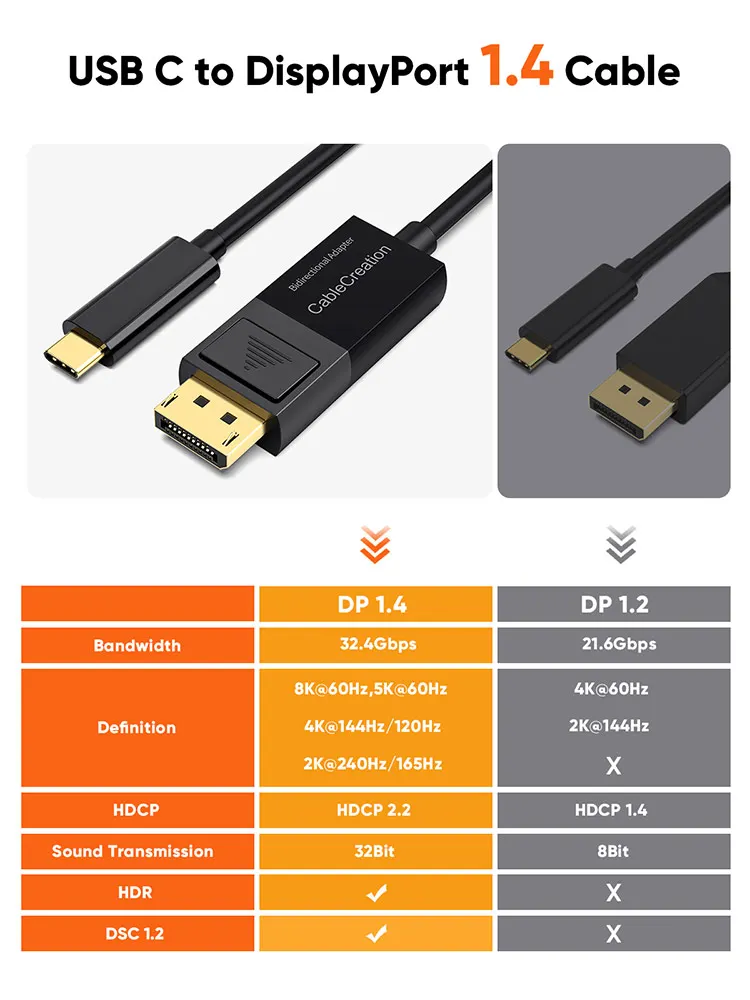
Bandwith: 32.4Gbps, HBR3
Resolution: Max 8K@60Hz
Color Depth: 48Bit
Suport HDR 3D View Experience
Compatible with DP 1.4/1.3/1.2/1.1
Wide Compatibility
Compatible with MacBook Pro/Air M1 2020/ 2019/ 2018, iMac 2017/ iMac Pro, Mac Mini M1/ 2018, iPad Pro M1 2021/ 2020/ 2018, XPS 12/ 13/ 15, EliteBook Folio G1/ Spectre 13, Thinkpad E580/ T470/ X1 Carbon (2017)/ Yoga 900/ 910/ 912, Chromebook Pixel (2015)/ Pixelbook, Surface Pro 7 / 8, Surface Book 2/ Surface Go, Galaxy Tab S4/ S5e/ S6/ S7 and other galaxy cellphone that support DEX mode (S22/ S22 Ultra/ S20/ S20+/ S20 Ultra/ S10/ S9/ S8/ Note10/ Note9/ Note8)
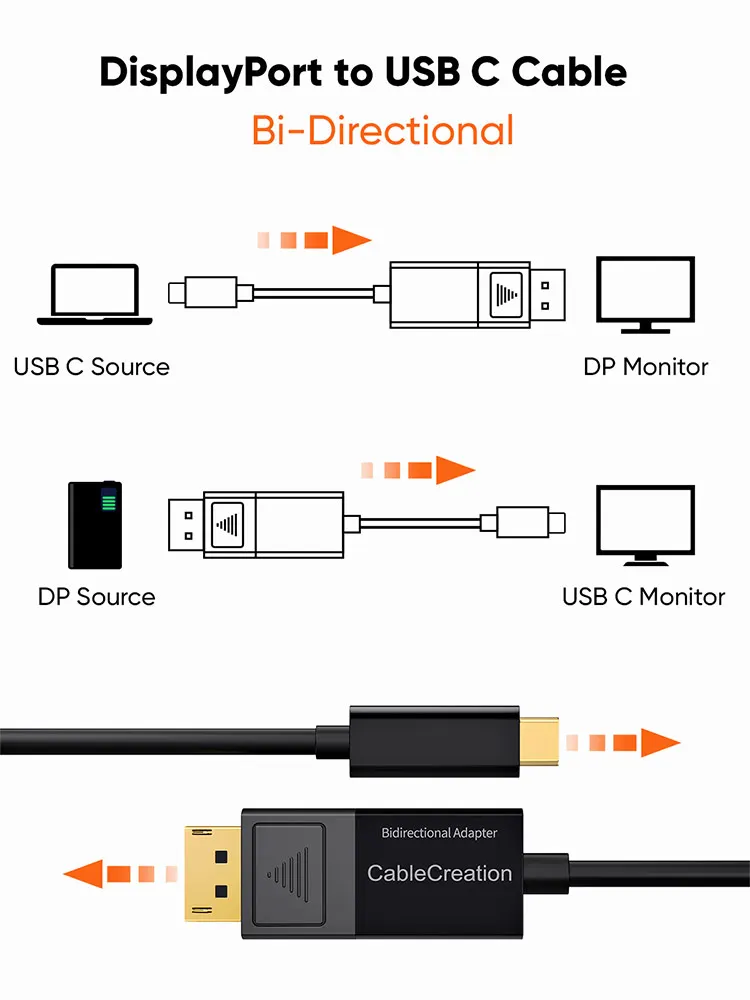
Bi-Directional USBC to DP Cable
This 6FT USB C to DP cable allows to transfer USB C source to DisplayPort Monitor and also support DisplayPort source to USB C Monitor. PLEASE NOTE: One of the end must be a Monitor. No more flickering or audio cutting out issues to give you a really comfortable experience for sports events, movies and show photos/albums. No adapter, driver or software required
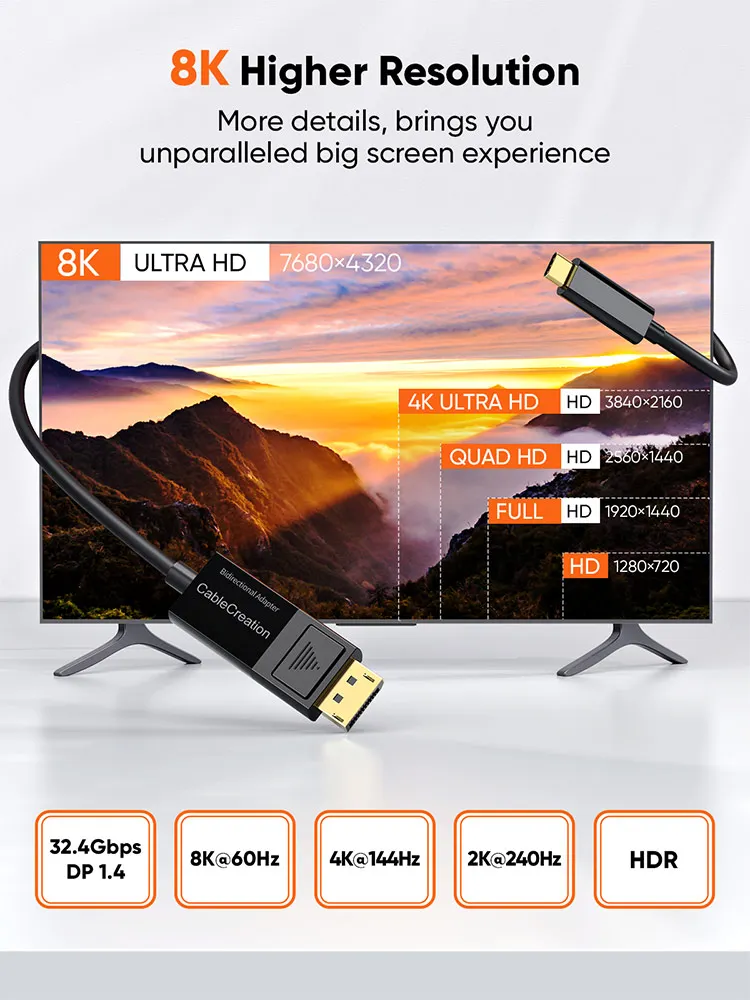
8K@60Hz Unparalleled Performance
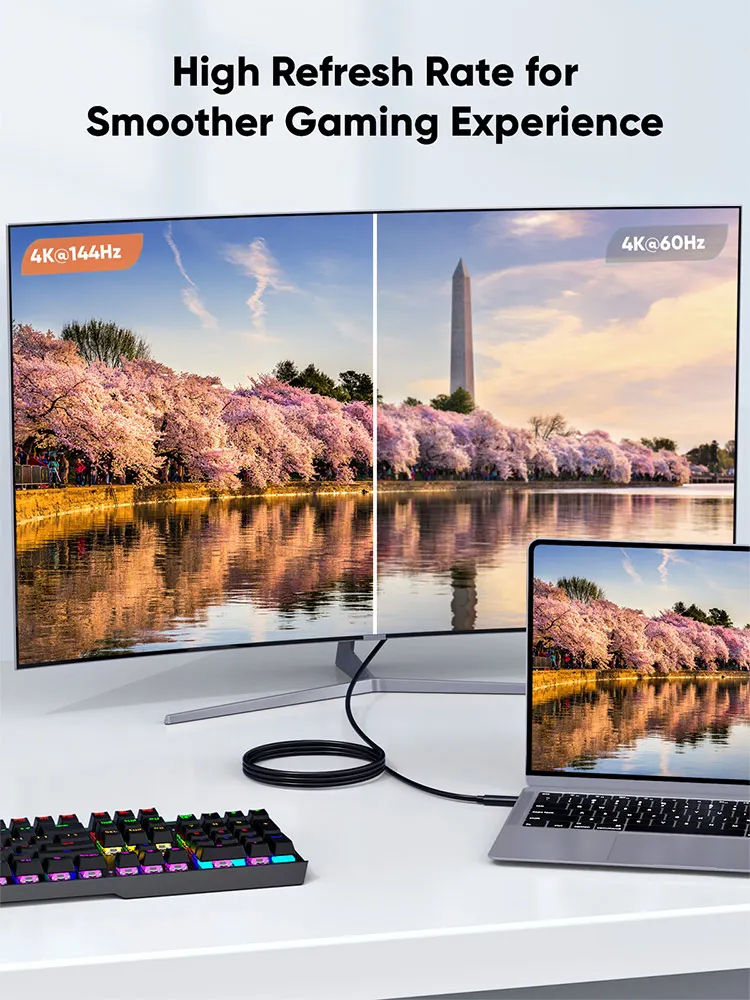
Display Port to USB C cable supports 8K Ultra HD video, downwards compatible with 5K@60Hz, 4K@144Hz, 2K@240Hz, 2K@165Hz and lower. When used with Mac devices the cable supports mirror or extend mode and when used with Windows devices it supports duplicate or extend mode. The USB-C to DisplayPort cord also supports MST daisy chaining
FAQs:
Q1: The DP to USB C Cable is not bidirectional.
A: Our usb-c to displayport cable is bidirectional. It supports to stream from USB C Phone/Laptop/ Tablet to Monitor with DisplayPort or steam from DisplayPort Desktop/Laptop to Monitor with USB C Port.
But kindly NOTE that:
1. When connect USB-C enabled laptop/ cellphone/ tablet to DP-equipped monitor, please make sure that your USB-C host support DP Alt Mode or Thunderbolt 3, or it will NOT work!!!
2. When connect DisplayPort PC to USB C monitor, please make sure that your USB-C display must support DisplayPort signal output.
3. One of the end must be a monitor, it does NOT support to connect PC to PC!!!
Q2: My monitor screen keeps flickering.
A: Please make sure the usbc to dp cable is stable connected and do not move your cellphone/ laptop and cable during use, then restart your cellphone/ laptop to try again.
Q3: I connect my USB-C laptop to DP monitor with the usb c dp cable but it doesn't work.
A: If your USB-C laptop support DP Alt Mode, but the cable does not work, we suggest you:
1). Go to the official website of your laptop, update the BIOS and graphics driver, then restart your laptop to try again.
2). Set the laptop's resolution same as or lower 1080P.
Q4: It doesn't do 60Hz or HDR.
A: Our displayport to usbc cable supports max 8K@60Hz definition and HDR. But please note that display performance is subject to the host and external display. To experience 8K & HDR, both of your usb-c and dp devices are required to support 8K and HDR.
What Our Customers Say
Absolutely no complaints!
I recommend this without any reservations. It's excellent.
- Lincoln S..
Absolutely no complaints!
This product is a brilliant choice. It's a solid, well-built item.
- Oaklyn N..
Absolutely no complaints!
This is a product I feel proud to own. The quality is exceptional.
- Ivan H..